Some men see things as they are
Some men see things as they are and say “Why?” I dream things that never were, and say, “Why not?”
– George Bernard Shaw
Some men see things as they are and say “Why?” I dream things that never were, and say, “Why not?”
– George Bernard Shaw
My good friend Dan (@dlinstedt) has put together a sweet set of three videos to introduce everyone to the wonderful world of Data Vault.
When you sign up you will get a set of email messages from Dan discussing the Data Vault Approach to data warehousing. You get access to three videos about the architecture, the methodology, and the modeling technique.
Plus you get free downloads of the first few chapters of the data vault book Super Charge Your Data Warehouse.
So if you have always wanted to learn more about Data Vault, but don’t have the budget for a full on class, this offer will get you headed in the right direction.
Head on over to the Learn Data Vault site now. It is all free.
(NB: this is an affiliate link. If you eventually buy the book or some other training off Dan’s site, I will get a small piece of the action. Not enough to retire mind you, but it might buy lunch.)
The videos are pretty cool. Enjoy.
Kent
So here is another tip on using Oracle SQL Developer Data Modeler – but this time it is one I will NOT be showing during my session at #KScope13.
In SDDM there is a really nice wizard for building views. Once your view is built, you should probably test it right?
You could generate the DDL, or use DDL Preview, then open up SQL Developer, run the script to build the view, then select from the view to see the results.
Lotta steps, eh?
Or you could simply use the Test Query button on the View Properties dialog.
Press the button, then select a database connection from the drop down list (or create a new one if you need to). This will create a connection to the database and cause the SQL in the view to be executed. If everything works you will see “Query executed successfully”.
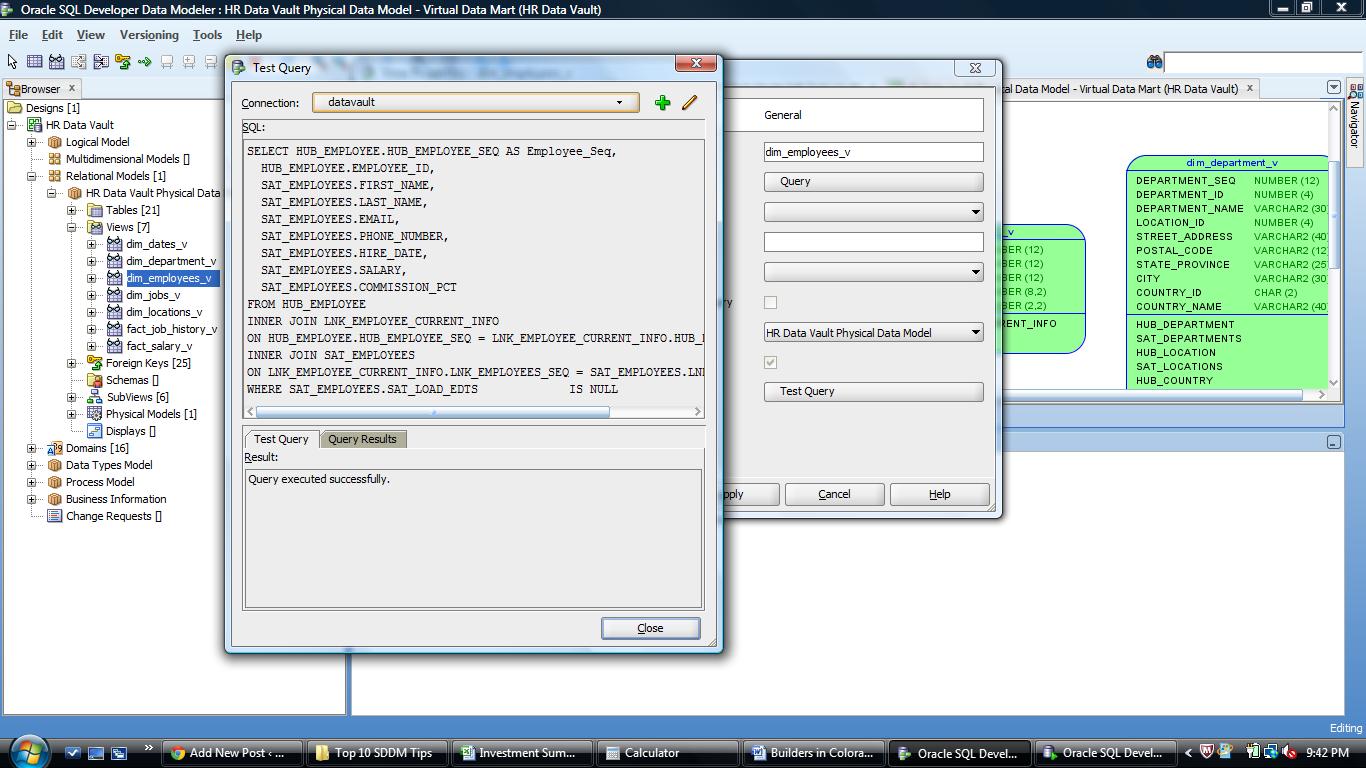
” The Test Query button will first check that the SQL will execute
If you want to see the output of the query, just click the Query Results tab.

The Query Results tab lets you examine the output without opening another tool
Pretty cool. And must faster than the old way.
Now for the Challenge:
Your reward:
Not a million dollars, but who knows where it might lead or who else you might meet along the way.
So, who’s up to the challenge?
See you in New Orleans.
Oh – if oyu missed the first tip, it is here.
Kent
P.S. Jeff (@thatJeffSmith) and Chet (@OracleNerd) – sorry guys but you are not eligible! (I may buy you beer anyway)
Great information this morning from @Claudia_Imhoff on Twitter:
#BDA13 Investing to improve health, wellness and community vitality pays off for business and society:twitpic.com/cvlz42
— Claudia Imhoff (@Claudia_Imhoff) June 6, 2013
Pay me now, or pay me later…
It is amazing what impact an upfront investment can return over the longer term.
And that applies in so many areas.
Later.
Kent
This year’s ODTUG KScope conference is less than a month away and I am ready to get to New Orleans and meet up with all my friends and colleagues to talk shop and learn some new things.
So in hopes of getting you to attend, I will share with you one of my productivity tips for using SQL Developer Data Modeler (SDDM).
I love this tool. I use it every single day in my work building data warehouses for my clients.
Really.
It’s easy – just right click on the table (or view) you want to check and Voila!

Right mouse over object to get preview option
Once you pick “DDL Preview”, then you get the DDL in another window.

Example of DDL script in Preview Window
With this you can:
1. Check the design to see if it is what you wanted/expected.
2. Copy and paste it to a worksheet in SQL Developer where you can then execute it (if you have the rights!).
One more cool thing is that if you leave the DDL window open, you can now click on any other object in the open diagram and instantly see the DDL for that object.
So there you go – really 3 tips for the price of one!
If you want more, I will be presenting my Top 10 SDDM Tips and Tricks at KScope13 in New Orleans in a few weeks. So go register now!
See you in NOLA!
Kent
Kent - The Data Warrior


Alumni

Now in paperback!

Kindle format on Amazon

Click to buy on Amazon

Learn Oracle Data Modeler from The Data Warrior


 The Data Warrior
You must be logged in to post a comment.