The Data Warrior

Changing the world, one data model at a time. How can I help you?

Archive for the tag “#cloud”

Support for Multiple Workloads in Snowflake DB

Excerpt from my most recent post on the Snowflake blog:

With our unique Multi-cluster, shared data architecture, Snowflake can easily support multiple and disparate workloads.  This is a common issue in traditional data warehouses so it makes total sense to be able to keep disparate workloads separate, to truly avoid resource contention, rather than just saying we support “mixed” workloads.

Read the rest here: Support for Multiple Workloads


Love your data!

Kent

The Data Warrior

p.s. Don’t forget to join me a #WWDVC May 25-28 in Stowe, Vermont. I will be giving away a GoPro! after my talk on Thursday.

Top 10 Cool Things I Like About Snowflake Elastic Data Warehouse

I have now been with Snowflake Computing for a little over two months (my how time flies). In that time, I have run the demo, spoken at several trade shows, and written a few blogs posts. I have learned a ton about the product and what it means to be an Elastic Data Warehouse in the Cloud.

So for this post I am going to do a quick rundown of some of the coolest features I have learned about so far.

See the rest of the post here on the Snowflake blog: Top 10 Cool Things I Like About Snowflake – Snowflake

Happy Friday!

Kent

The Data Warrior

Do Not Follow…Leave a Trail!

Do not follow where the path may lead…

Go instead where the is no path and leave a trail

— Ralph Waldo Emerson

Good advice in general.

I am very happy to be working for Snowflake Computing (@snowflakedb) and our CEO Bob Muglia (@bob_muglia) where we are forging the path for Elastic Data Warehousing (#ElasticDW)

We (Snowflakes) had a great time at Data Day Texas (#DDTX16) in Austin over the weekend. I think it is fair to say people are excited to see the trail we are blazing.

Have a great week!

Kent

The Data Warrior and Snowflake Evangelist

P.S. You can find the slides from my Data Day presentation on my LinkedIn profile or at slideshare.net/kgraziano

Tech Tip: Connect to Snowflake db using #SQLDevModeler

So, some of you may have noticed that I took “real” job this week. I am now the Senior Technical Evangelist for a cool startup company called Snowflake Computing.

Basically we provide a data warehouse database as a service in the cloud.

Pretty cool stuff. (If you want to know more, check out our site at snowflake.net)

I will talk more about the coolness of Snowflake (pun intended) in the future, but for now I just want to show you how easy it is to connect to.

Of course the first thing I want to do when I meet a new database is see if I can connect my most favorite data modeling tool, Oracle SQL Developer Data Modeler (SDDM),  to it and reverse engineer some tables.

The folks here told me that tools like Informatica, MicroStrategy, and Tableau connect just fine using either JDBC or ODBC, and that since we are ANSI SQL compliant, there should be no problem.

And they were right. It was almost as easy as connecting to Oracle but it was WAY easier than connecting to SQL Server.

First you need a login to a Snowflake database. No problem here. Since I am an employee, I do get a login. Check.

We have both a web-UI and a desktop command line tool. Turned out I needed the command line tool which incidentally needed our Snowflake JDBC connector to work. Followed the Snowflake documentation, downloaded the JDBC drive (to my new Mac!). Piece of cake.

So connecting from SDDM is really easy. First add the 3rd party JDBC driver in preferences. Preferences ->Data Modeler -> Third Party JDBC Driver (press the green + sign, then browse to the driver).

Add JDBC Driver

As you can see our JDBC driver is conveniently named snowflake_jdbc.jar.

Next step is to configure the database connection. To do this you go to File -> Import -> Data Dictionary, then add a new connection in the wizard.

Configure Connection

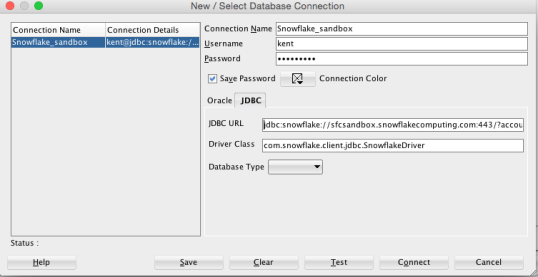
Give at a name and login information, then go to the JDBC tab.

So getting the URL was the trick (for me anyway). Luckily the command line tool displayed the URL when I launched it in a terminal window, so I just copied it from there (totally wild guess on my part).

So the URL (for future reference) is:

jdbc:snowflake://sfcsandbox.snowflakecomputing.com:443/?account=<service name>&user=<account>&ssl=on

Where account is whatever you named your account in Snowflake (once you have one of your very own that is).

The driver class was a little trickier – I had to read our documentation! Thankfully it is very good and has an entire section on how to connect using JDBC. In there I found the drive class name:

com.snowflake.client.jdbc.SnowflakeDriver

That was it.

I pushed the Test button and success!

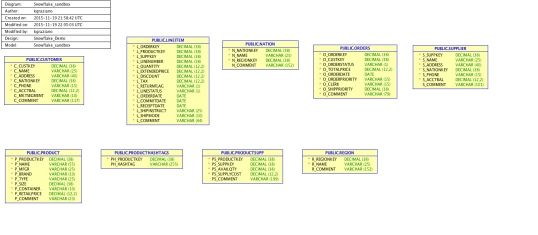
Now to really test it, I did the typical reverse engineer and was able to see the demo schema and tables and brought them all in.

Snowflake Schema

Demo schema in Snowflake (no, not a snowflake schema!)

So I call that a win.

Not a bad weeks work really:

  1. New job orientation
  2. Start learning a new tech and the “cloud”
  3. Got logged in
  4. Installed SDDM on a Mac for the 1st time ever!
  5. Configured to speak to an “alien” database
  6. Successfully reverse engineer a schema
  7. Blog about it.

So that was my 1st week a a Senior Technical Evangelist.

TGIF!

Kent

still, The Data Warrior

P.S. If you want to see more about my week, just check my twitter stream and start following @SnowflakeDB too.


Let’s Review #OOW13 and #OTW13 in Pictures

Yes I have been derelict in my duty and not posted about the sessions I attended at Oracle OpenWorld (#OOW13) and OakTable World (#OTW).

Well here are the high points with pictures!

Monday

Monday started off with the now annual Swim the Bay (so I missed the keynote). If you have Facebook, you can see pictures from the event here.

Most of the day I then spent at the alternate conference, OakTable World (#OTW13) seeing a few talk and giving one myself.

My good friend from Denver, Tim Gorman gave a nice talk about all the data compression options available in Oracle.

Tim Gorman: Oracle Compression Options

Tim Gorman: Oracle Compression Options

Next was a great session from the well known blogger and author Fabian Pascal. I have been reading his work for years but this was the first time I got to hear him speak in person. As with his writing, the talk was both intellectually stimulating and challenging!

Fabian Pascal: The Last Null

Fabian Pascal: The Last Null

It really is quite a debate in the database world about the meaning and use of NULL in an RDBMS. Fabian has a proposal on how we can (and should) represent data in a way where there will never be NULL attributes.

After a some scheduling issues. later in the day, I did my presentation on using Data Vault Modeling for Agile Data Warehouse Modeling. The room I got had a huge wall for me to project my session on. Definitely the biggest screen ever for one of my talks.
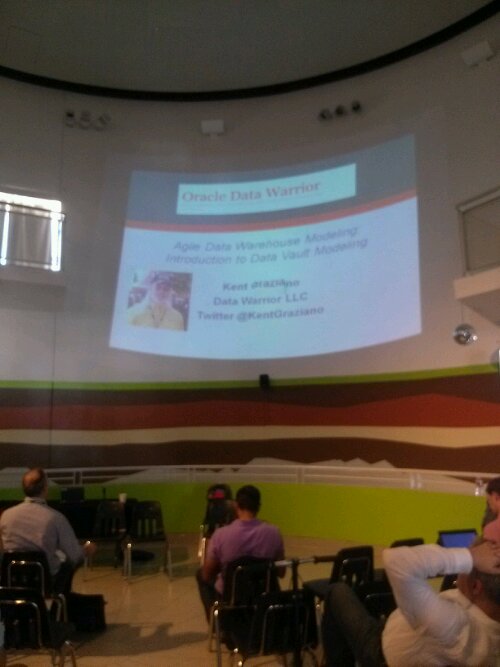
Biggest screen ever for me and my data vault presentation.

Biggest screen ever for me and my data vault presentation.

Tuesday

Started the morning with a few friends doing morning Chi Gung in Union Square, then followed by getting a quick survey of the exhibit hall in Moscone South and a trip to the Demo grounds.

The throng descends into the depths of Moscone West to hunt the exhibit hall for goodies.

The throng descends into the depths of Moscone West to hunt the exhibit hall for goodies.

The hall was of course HUGE as usual so some of the vendors who were tucked in back got creative on getting the foot traffic to come their way.

A clever gimmick one vendor did to get traffic to their booth in the gigantic hall

A clever gimmick one vendor did to get traffic to their booth in the gigantic hall

For sessions, I attend a road map session on Oracle’s Big Data strategy given by my friend JP Dijcks.

JP talks all things Big Data

JP talks all things Big Data

Mostly he painted a picture of the issues with figuring out how to collect and put all that data to real work. Of course Oracle has a ton of products to offer to help solve the problem.

How to shrink the gap between getting big data and actually using it!

How to shrink the gap between getting big data and actually using it!

Next up I attended Jeff Smith’s session on SQL Developer 4.0 and got to learn that there was a data mining extension available for the tool that makes doing some advanced analytics a lot easier.

Definition for Data Mining. An extension for Data Mining is available for SQL Developer.

Definition for Data Mining. An extension for Data Mining is available for SQL Developer.

Next on my agenda was the Cloud keynote with Microsoft. I wrote about that here.

Finally for the day, a late presentation by Maria Colgan and Jonathan Lewis giving us their top tuning tips in what they called the SQL Tuning Bootcamp.
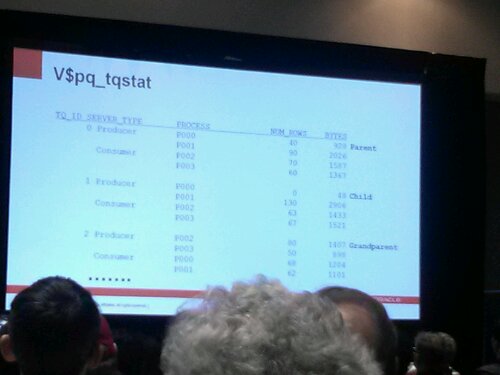
Optimizer tips from a pro Jonathan Lewis. I am sure it means something to someone out there!

Optimizer tips from a pro Jonathan Lewis. I am sure it means something to someone out there!

As always with these type session, there was a ton of useful information that makes my brain hurt. I have to keep reviewing  my notes to make sure I can use at least 10% of what they taught.

Wednesday

This was mostly a work day for me at a client site. And a late lunch to see the final race of the America’s Cup.

In case you have been under a rock since last week, Team USA won! It was great to actually be there on Pier 27 during the final race. Not a great vantage point overall but with the big screen to watch and then seeing the boats right after they finished, it was worth the walk.

After the race and a little more data model work at my client’s office, I walked back to the conference to see a final session (for me) given by Gwen Shapira about using solid state disks with Exadata.

I really did not know much about SSDs before this session but feel really educated now. I actually had no idea that SSD and FLASH drives or FLASH memory were the same thing. Guess I was behind on the hardware buzzwords.
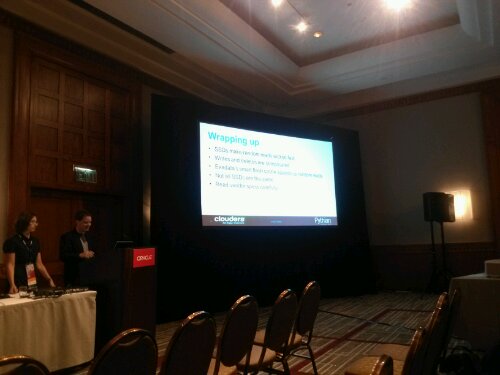
Gwen and Mark on Solid State Disk AKA Flash

Gwen and Mark on Solid State Disk AKA Flash

Then it was off to the annual blogger meetup then dinner on the town with friends at The Stinking Rose (thanks Tim!).

I decided to skip the appreciation event this year and take it easy, have a nice dinner, then pack up to head home. Thursday it was breakfast at Lori’s Diner then off to the airport and back home.

As a reminder if you want to see what the buzz was at the events, just check out the hashtags #OOW13 and #OTW13 on twitter (if you had a big data machine you might even be able to generate some insight from those feeds).

Well that’s a wrap for this years big show.

Next up, I will be speaking at the upcoming ECO conference in North Carolina. Should be fun.

Later.

Kent

P.S. If you want to see my OTW presentation, you can find them on Slideshare.

P.P.S. For another great review of OOW13 check out this post by my friend from Turkey, Gurcan. See if you can find my unlabeled cameo in the post.

Post Navigation