The Data Warrior

Changing the world, one data model at a time. How can I help you?

Archive for the category “Data Modeling”

See you at KScope13!

Are you ready?

It is almost time for the annual ODTUG KScope conference in New Orleans. It starts with the Community Service Day on Saturday June 22nd and runs through Thursday June 27th at the Sheraton Hotel right on the edge of the French Quarter.

For my readers that are attending, I will be giving three talks this year, leading morning Chi Gung classes,  as well as sitting on the BI Lunch and Learn Panel.

My talks will be:

Five Ways to Make Data Modeling Fun – Monday at 9:45 AM

Using OBIEE and Data Vault to Virtualize Your BI Environment: An Agile Approach – Monday at 3 PM (with Stewart Bryson)

Top Ten Cool Features in Oracle SQL Developer Data Modeler – Tuesday at 12:15 PM

And on Wednesday at 10:45 AM you will find me in Social Media Lounge getting interviewed about Data Modeling, ODTUG, and KScope.

If you are joining me for Morning Chi Gung, I believe we will meet in the hotel lobby at 6:45 AM so we can walk to the river front park where we will hold our class. It is only a 30 minute class right before breakfast so please give it a try and get energized for a long day of learning and networking! Follow me on twitter @KentGraziano for any updates to the location and meeting time.

Don’t forget to download the new KScope Mobile App so you can keep track of your schedule and not miss any of these sessions.

See you in New Orleans!

Kent

The Oracle Data Warrior
Another Free Tip for SQL Developer Data Modeler (and a Challenge)

So here is another tip on using Oracle SQL Developer Data Modeler – but this time it is one I will NOT be showing during my session at #KScope13.

In SDDM there is a really nice wizard for building views. Once your view is built, you should probably test it right?

You could generate the DDL, or use DDL Preview, then open up SQL Developer, run the script to build the view, then select from the view to see the results.

Lotta steps, eh?

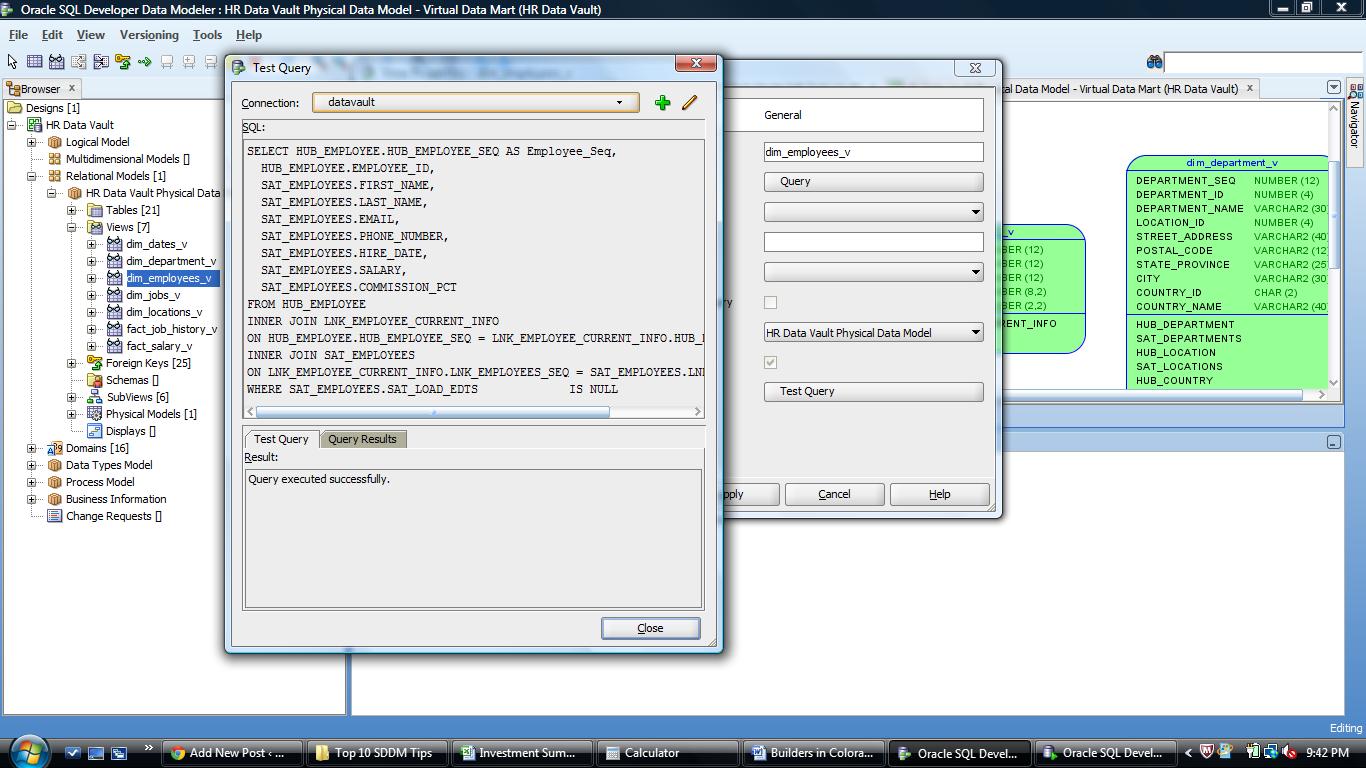
Or you could simply use the Test Query button on the View Properties dialog.

Press the button, then select a database connection from the drop down list (or create a new one if you need to). This will create a connection to the database and cause the SQL in the view to be executed. If everything works you will see “Query executed successfully”.

The Test Query button will first check that the SQL will execute

The Test Query button will first check that the SQL will execute

If you want to see the output of the query, just click the Query Results tab.

The Query Results tab lets you examine the output without opening another tool

The Query Results tab lets you examine the output without opening another tool

Pretty cool. And must faster than the old way.

Now for the Challenge:

  1. You must be attending KScope13.
  2. You must be the first person to find me onsite in New Orleans and tell me you read this post.
  3. You then have to show up at my Top Ten Tips session at the conference, join me at the podium and tell the attendees this tip!

Your reward:

  1. It might be your first chance to present at an international conference.
  2. I will buy you the adult beverage of your choice that evening and chat about SDDM (or another topic of your choosing).

Not a million dollars, but who knows where it might lead or who else you might meet along the way.

So, who’s up to the challenge?

See you in New Orleans.

Oh – if oyu missed the first tip, it is here.

Kent

P.S. Jeff (@thatJeffSmith) and Chet (@OracleNerd) – sorry guys but you are not eligible! (I may buy you beer anyway)

The 1st Tip is Free: Oracle SQL Developer Data Modeler

This year’s ODTUG KScope conference is less than a month away and I am ready to get to New Orleans and meet up with all my friends and colleagues to talk shop and learn some new things.

So in hopes of getting you to attend, I will share with you one of my productivity tips for using SQL Developer Data Modeler (SDDM).

DDL Previewer

I love this tool. I use it every single day in my work building data warehouses for my clients.

Really.

It’s easy – just right click on the table (or view) you want to check and Voila!

Right mouse over object to get preview option

Right mouse over object to get preview option

Once you pick “DDL Preview”, then you get the DDL in another window.

Example of DDL script in Preview Window

Example of DDL script in Preview Window

With this you can:

1. Check the design to see if it is what you wanted/expected.

2. Copy and paste it to a worksheet in SQL Developer where you can then execute it (if you have the rights!).

One more cool thing is that if you leave the DDL window open, you can now click on any other object in the open diagram and instantly see the DDL for that object.

So there you go – really 3 tips for the price of one!

If you want more, I will be presenting my Top 10 SDDM Tips and Tricks at KScope13 in New Orleans in a few weeks. So go register now!

See you in NOLA!

Kent


Are you certifiable?

Just a quick note to let everyone know that Dan Linstedt, (inventor of the Data Vault Model and Methodology) has announced that he will be teaching a live Data Vault 2.0 Certification Class on July 29th in St Albans, Vermont.

This class will cover all the new DV2.0 standards which incorporate big data, and NoSQL as options for implementation.

So do you have what it takes to become a Certified Data Vault Practitioner – CDVP2?

Check out these details:

Concepts that are covered include the following:

  • Implementation (ETL & SQL) best practices – structured, performance and restartability
  • Data Integration Strategies – real time, big data, and unstructured
  • Overview of Architecture – 3 tier systems architecture
  • Overview of Methodology – agile project planning & delivery
  • Overview of Data Vault Modeling – DV tables, patterns, business vault
  • Foundation of NoSQL & Big Data – where it fits, key structures, parallel loading
  • DV2.0 Methodology (Agility, Roles and Responsibilities, Architecture, CMMI Level 5)
  • DV2.0 Structure Changes
  • Managed Self Service BI
  • Loading Templates (including DV2.0 performance improvements)
  • Business Vault – introduction and overview, application & use

The new course relies heavily on the Super Charge your Data Warehouse book. Students must have completed reading the book before attending class. The class will spend minimal time covering the structural details of the Data Vault itself, and will focus more on the application of the Data Vault, the methodology (or project implementation), and the overall architecture. Including a look at managed self-service BI.

via Data Vault Certification | Class Descriptions.

Get the time, place, costs etc. on the Data Vault Certification site.

Join the elite ranks of certified Data Vault Practitioners.

Get certified!

Take care.

Kent

Get thee to KScope13!

Jeff Smith (@thatjeffsmith) just posted a great little piece about why you can’t afford to miss this year’s ODTUG event in New Orleans: KScope13. As usually I will be speaking there as well and running my now annual Morning Chi Gung classes.

Get thee to KScope13!

See you there.

Kent

Post Navigation