The Data Warrior

Changing the world, one data model at a time. How can I help you?

Archive for the category “Oracle”

See you at KScope13!

Are you ready?

It is almost time for the annual ODTUG KScope conference in New Orleans. It starts with the Community Service Day on Saturday June 22nd and runs through Thursday June 27th at the Sheraton Hotel right on the edge of the French Quarter.

For my readers that are attending, I will be giving three talks this year, leading morning Chi Gung classes,  as well as sitting on the BI Lunch and Learn Panel.

My talks will be:

Five Ways to Make Data Modeling Fun – Monday at 9:45 AM

Using OBIEE and Data Vault to Virtualize Your BI Environment: An Agile Approach – Monday at 3 PM (with Stewart Bryson)

Top Ten Cool Features in Oracle SQL Developer Data Modeler – Tuesday at 12:15 PM

And on Wednesday at 10:45 AM you will find me in Social Media Lounge getting interviewed about Data Modeling, ODTUG, and KScope.

If you are joining me for Morning Chi Gung, I believe we will meet in the hotel lobby at 6:45 AM so we can walk to the river front park where we will hold our class. It is only a 30 minute class right before breakfast so please give it a try and get energized for a long day of learning and networking! Follow me on twitter @KentGraziano for any updates to the location and meeting time.

Don’t forget to download the new KScope Mobile App so you can keep track of your schedule and not miss any of these sessions.

See you in New Orleans!

Kent

The Oracle Data Warrior

Another Free Tip for SQL Developer Data Modeler (and a Challenge)

So here is another tip on using Oracle SQL Developer Data Modeler – but this time it is one I will NOT be showing during my session at #KScope13.

In SDDM there is a really nice wizard for building views. Once your view is built, you should probably test it right?

You could generate the DDL, or use DDL Preview, then open up SQL Developer, run the script to build the view, then select from the view to see the results.

Lotta steps, eh?

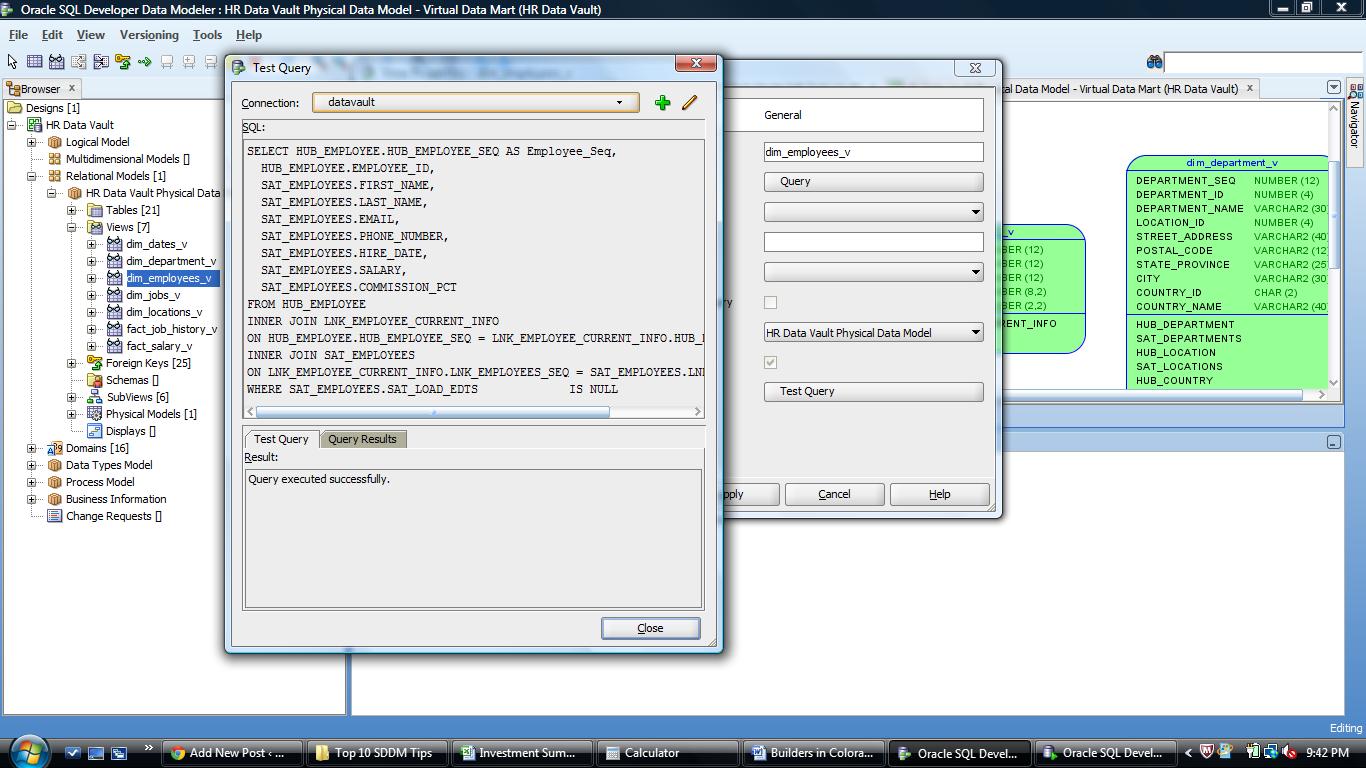
Or you could simply use the Test Query button on the View Properties dialog.

Press the button, then select a database connection from the drop down list (or create a new one if you need to). This will create a connection to the database and cause the SQL in the view to be executed. If everything works you will see “Query executed successfully”.

The Test Query button will first check that the SQL will execute

The Test Query button will first check that the SQL will execute

If you want to see the output of the query, just click the Query Results tab.

The Query Results tab lets you examine the output without opening another tool

The Query Results tab lets you examine the output without opening another tool

Pretty cool. And must faster than the old way.

Now for the Challenge:

  1. You must be attending KScope13.
  2. You must be the first person to find me onsite in New Orleans and tell me you read this post.
  3. You then have to show up at my Top Ten Tips session at the conference, join me at the podium and tell the attendees this tip!

Your reward:

  1. It might be your first chance to present at an international conference.
  2. I will buy you the adult beverage of your choice that evening and chat about SDDM (or another topic of your choosing).

Not a million dollars, but who knows where it might lead or who else you might meet along the way.

So, who’s up to the challenge?

See you in New Orleans.

Oh – if oyu missed the first tip, it is here.

Kent

P.S. Jeff (@thatJeffSmith) and Chet (@OracleNerd) – sorry guys but you are not eligible! (I may buy you beer anyway)

The 1st Tip is Free: Oracle SQL Developer Data Modeler

This year’s ODTUG KScope conference is less than a month away and I am ready to get to New Orleans and meet up with all my friends and colleagues to talk shop and learn some new things.

So in hopes of getting you to attend, I will share with you one of my productivity tips for using SQL Developer Data Modeler (SDDM).

DDL Previewer

I love this tool. I use it every single day in my work building data warehouses for my clients.

Really.

It’s easy – just right click on the table (or view) you want to check and Voila!

Right mouse over object to get preview option

Right mouse over object to get preview option

Once you pick “DDL Preview”, then you get the DDL in another window.

Example of DDL script in Preview Window

Example of DDL script in Preview Window

With this you can:

1. Check the design to see if it is what you wanted/expected.

2. Copy and paste it to a worksheet in SQL Developer where you can then execute it (if you have the rights!).

One more cool thing is that if you leave the DDL window open, you can now click on any other object in the open diagram and instantly see the DDL for that object.

So there you go – really 3 tips for the price of one!

If you want more, I will be presenting my Top 10 SDDM Tips and Tricks at KScope13 in New Orleans in a few weeks. So go register now!

See you in NOLA!

Kent


Another First at ODTUG’s #Kscope13

Those crazy kids at ODTUG have done it again!

At this year’s KScope in New Orleans this user group is introducing an evening of crossover sessions. Over the years the event has grown and actually blended the traditional Oracle database development world with the world of EPM, Hyperion, and Essbase.

In fact many folks who have come down the typical Oracle development path, myself included, know very little about the other side. So for these past few years at the conference we found there were not a lot of people crossing the various tracks (after all there are so many options to choose from).

In order to promote better cross pollination and as a way to encourage folks to expand their horizons and start to understand the “other” side, ODTUG has added two evening sessions on Tuesday so that we can gain that knowledge and not have to skip any of our regualr sessions.

The sessions will be presented by seasoned ODTUGers and Oracle ACEs. Check out these sessions:

Oracle Database Tools 101: How Does All This Stuff Get Built Anyway?

John King, King Training Resources

If you’ve been an Essbase/Hyperion, Applications, or BI user you may wonder what all the “hubbub” on the other side of Kscope is all about. Or maybe you’re curious — “I know there’s a database under the covers and lots of developers; what do they do?” If you want to know about the underpinnings of your favorite Oracle software, this session is for you. We’ll talk about how it all fits together: database, SQL, PL/SQL, ADF, Forms, APEX, and more (without too many boring details)! Attending this session will improve your understanding of and ability to communicate with the “bit-twiddlers” in your organization.

Hyperion 101: An Introduction to the Oracle Enterprise Performance Management Suite

Andrew Jorgensen, MindStream Analytics

Have you been hearing all this talk about Oracle Hyperion? Are you wondering what exactly an Essbase is?

This is the session for those who are looking for an introduction into Business Intelligence and Enterprise Performance Management. We’ll start with the core business problems that are addressed with these products. The session will then include an overview of all the products that cover the Oracle Hyperion Suite and what each is best used for. We’ll finish this session covering a variety of reporting options including OBIEE.

Get more details here: ODTUG Kscope13: Expertise + Crossover.

If you have not yet signed up to attend KScope13, it’s not too late. Just get on over to the registration page and get in on the learning!

See you in New Orleans!

Kent

P.S. I will of course be there so be sure to look me up and attend one of my sessions.


Oracle Designer Lives!

Amazing as it seems, I picked this article up on Twitter today.

An up to date, current, and NEW article about automating builds of applications from the Oracle Designer repository.

How very agile…

Thanks to all the gang over at AMIS (http://technology.amis.nl/) for keeping the technology alive and for being innovative enough to adapt it for the modern agile development world.

Running Oracle Designer Generation from Ant and Hudson

Introduction

Oracle Designer is a windows client-server development tool that is meant to be manually operated by a developer. Anyone trying to integrate Designer with an automatic build environment will find that it does not provide an API or a commandline version to kick-off any generation automatically.

There is however a hook that can be exploited by generating so-called GBU files directly from the Designer Repository. These GBU files are then fed to an executable called dwzrun61.exe that executes the actual generation of DDL scripts and forms.

This article describes how this can be done using examples from a real world situation. It shows how to generate the GBU files, the different strategies that can be followed and some of the pitfalls you might run into trying to pull this off yourself.

The code of the program we wrote can be found on here and is free to be adjusted to fit any other situation than ours.

via Running Oracle Designer Generation from Ant and Hudson.

If you want to meet some of the guys from AMIS and pick their brains, be sure to sign up for KScope13 and come meet them live in person.

See you there.

Kent

Post Navigation