A while back I had an interesting situation when I was attempting to reverse engineer and document a database for a client.
I had a 3rd party database that had PKs defined on every table but no FKs in the database. The question I posed (on the Data Modeler Forum) was:
How do I get the FK Discover utility to find FK columns with this type of pattern:
Parent PK column = TABCUSTNUM
Child FK column = ABCCUSTNUM
So the root column name (CUSTNUM) is standard but in every table the column name has a different 3 character “prefix” that is effectively the table short name. Is there way to get the utility to ignore the first three characters of the column names?
This was in SDDM 4.1.873.
No easy answer.
Well, the ever helpful Philip was very kind and wrote me a slick custom Transformation Script that did the trick! (Check the post if you want to see the code.)
But wait there’s more!
In his response he mentioned a feature coming in 4.1.888 – the ability to include a table prefix as part of a FK column naming template (just like this app had done).
Cool, I thought, but how does that help?
Well with the template in place it turns out that you can have the FK Discovery utility search based on the Naming Template model rather than just look for exact matching column names.
Using the Custom Naming Template
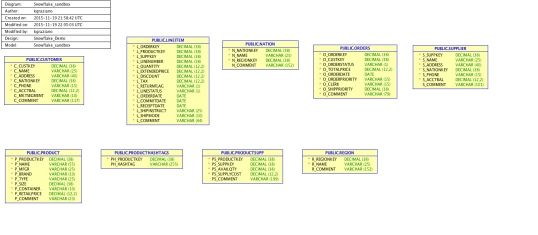
So recently (today in fact) I was trying to add FKs to the Snowflake DB model I reverse engineered a few weeks back (Jeff pointed out they were missing). I noticed the model had that pattern of a prefix on both the FK and PK column names.
In the CUSTOMER table the PK is C_CUSTKEY. In the ORDER table it is O_CUSTKEY. Nice simple pattern (see the diagram below for more). That reminded me of the previous issue and Philip’s script.
Off to OTN to find that discussion and refresh my memory.
In the post, Philip has posted an example of a template that fit my previous problem:
{table abbr}SUBSTR(4,30,FRONT,{ref column})
With the note that {table abbr} would be the equivalent of what I called the table prefix. So first I went to the table properties and put in the prefixes using the Abbreviation property:

Then all I had to do was modify his example to account for the underscore and the fact that the main column text would start at character #3 instead of #4:
{table abbr}_SUBSTR(3,30,FRONT,{ref column})
I input that by going to Properties -> Settings -> Naming Standards -> Templates and then editing the default template:

Discover FKs!
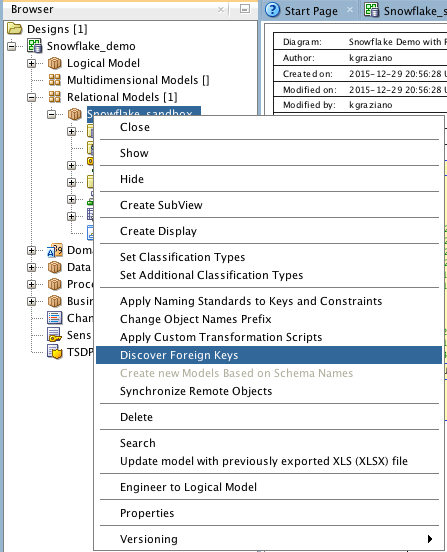
Now it was just a matter of running the utility. You find that with a right mouse click on the Relational Design node:
Next you get the list of candidate FKs:

Note that the utility also suggested some FKs based on the unique constraints (UKs) as well. I did not want those, so I unchecked them before I hit “OK”.
The result was getting all the FKs I wanted added into my model! Viola!
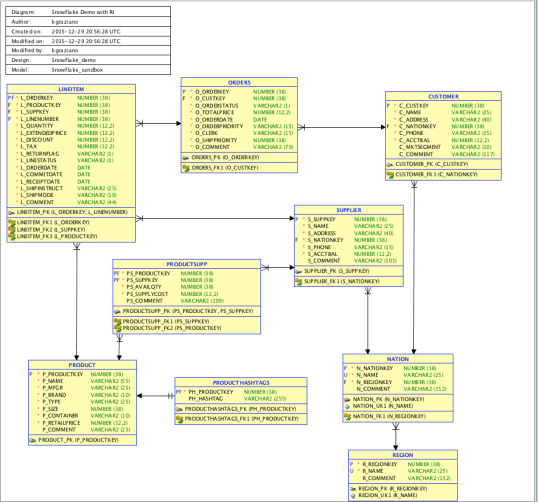
So I can happily report that Philip’s little enhancement works just fine in 4.1.3. WooHoo! I can see this being very useful for a lots of cases in the future.
In a future post (early next year), I will continue with showing how we implemented Referential Integrity constraints in Snowflake DB and if I can generate the DDL from #SQLDevModeler.
Happy New Year Y’all
Kent
The Data Warrior & Snowflake Technical Evangelist
Posted in
Data Modeling,
SnowflakeDB,
SQL Developer Data Modeler and tagged
#BetterDataModeling,
#SnowflakeDB,
#SQLDevModeler,
@SnowflakeDB,
@thatjeffsmith,
data model design,
Discover FK,
FKs,
Oracle Data Modeler.,
Oracle SQL Developer Data Modeler,
SQL Developer Data Modeler







 The Data Warrior
You must be logged in to post a comment.