The Data Warrior

Changing the world, one data model at a time. How can I help you?

Archive for the category “Data Modeling”

Better Data Modeling: Customizing Oracle Sql Developer Data Modeler (#SQLDevModeler) to Support Custom Data Types

On a recent customer call (for Snowflake), the data architects were asking if Snowflake provided a data model diagramming tool to design and generate data warehouse tables or to view a data model of an existing Snowflake data warehouse. Or if we knew of any that would work with Snowflake.

Well, we do not provide one of our own – our service is the Snowflake Elastic Data Warehouse (#ElasticDW).

The good news is that there are data modeling tools in the broader ecosystem that you can of course use (since we are ANSI SQL compliant).

If you have read my previous posts on using JSON within the Snowflake, you also know that we have a new data type called VARIANT for storing semi structured data like JSON, AVRO, and XML.

In this post I will bring it together and show you the steps to customize SDDM to allow you to model and generate table DDL that contain columns that use the VARIANT data type.

Read the details of how I did it here on my Snowflake blog:

Snowflake SQL: Customizing Oracle Sql Developer Data Modeler (SDDM) to Support Snowflake VARIANT – Snowflake

Enjoy!

Kent

The Data Warrior

P.S. If you are in Austin, Texas this weekend, I will be speaking at Data Day Texas (#DDTX16). Snowflake will have a booth there too, so come on by and say howdy!

Snowflake SQL: Making Schema-on-Read a Reality (Part 2)

This is the 2nd of my articles on the Snowflake blog.

In the first article of this series, I discussed the Snowflake data type VARIANT, showed a simple example of how to load a VARIANT column in a table with a JSON document, and then how easy it is to query data directly from that data type. In this post I will show you how to access an array of data within the JSON document and how we handle nested arrays. Then finally I will give you an example of doing an aggregation using data in the JSON structure and how simple it is to filter your query results by referring to values within an array.

Check out the rest of the post here:

Snowflake SQL: Making Schema-on-Read a Reality (Part 2) – Snowflake

Enjoy!

Kent

The Data Warrior

Better Data Modeling: Discovering Foreign Keys (FK) in #SQLDevModeler (SDDM)

A while back I had an interesting situation when I was attempting to reverse engineer and document a database for a client.

I had a 3rd party database that had PKs defined on every table but no FKs in the database. The question I posed (on the Data Modeler Forum) was:

How do I get the FK Discover utility to find FK columns with this type of pattern:

Parent PK column = TABCUSTNUM

Child FK column = ABCCUSTNUM

So the root column name (CUSTNUM) is standard but in every table the column name has a different 3 character “prefix” that is effectively the table short name. Is there way to get the utility to ignore the first three characters of the column names?

This was in SDDM 4.1.873.

No easy answer.

Well, the ever helpful Philip was very kind and wrote me a slick custom Transformation Script that did the trick! (Check the post if you want to see the code.)

But wait there’s more!

In his response he mentioned a feature coming in 4.1.888 – the ability to include a table prefix as part of a FK column naming template (just like this app had done).

Cool, I thought, but how does that help?

Well with the template in place it turns out that you can have the FK Discovery utility search based on the Naming Template model rather than just look for exact matching column names.

Using the Custom Naming Template

So recently (today in fact) I was trying to add FKs to the Snowflake DB model I reverse engineered a few weeks back (Jeff pointed out they were missing). I noticed the model had that pattern of a prefix on both the FK and PK column names.

In the CUSTOMER table the PK is C_CUSTKEY. In the ORDER table it is O_CUSTKEY. Nice simple pattern (see the diagram below for more). That reminded me of the previous issue and Philip’s script.
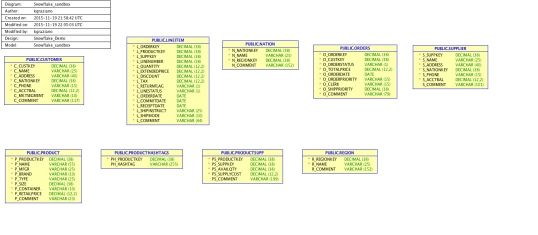
Snowflake Schema

Off to OTN to find that discussion and refresh my memory.

In the post, Philip has posted an example of a template that fit my previous problem:

{table abbr}SUBSTR(4,30,FRONT,{ref column})

With the note that {table abbr} would be the equivalent of what I called the table prefix. So first I went to the table properties and put in the prefixes using the Abbreviation property:

Add Table Abbrev

Then all I had to do was modify his example to account for the underscore and the fact that the main column text would start at character #3 instead of #4:

{table abbr}_SUBSTR(3,30,FRONT,{ref column})

I input that by going to Properties -> Settings -> Naming Standards -> Templates and then editing the default template:

Set up FK template

Discover FKs!

Now it was just a matter of running the utility. You find that with a right mouse click on the Relational Design node:
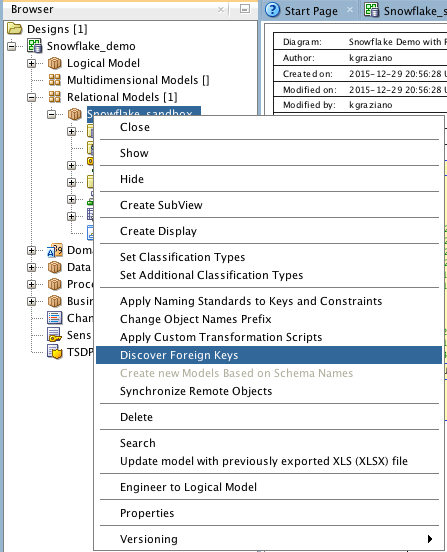
Discover FK tool

Next you get the list of candidate FKs:

Create FKs

Note that the utility also suggested some FKs based on the unique constraints (UKs) as well. I did not want those, so I unchecked them before I hit “OK”.

The result was getting all the FKs I wanted added into my model! Viola!
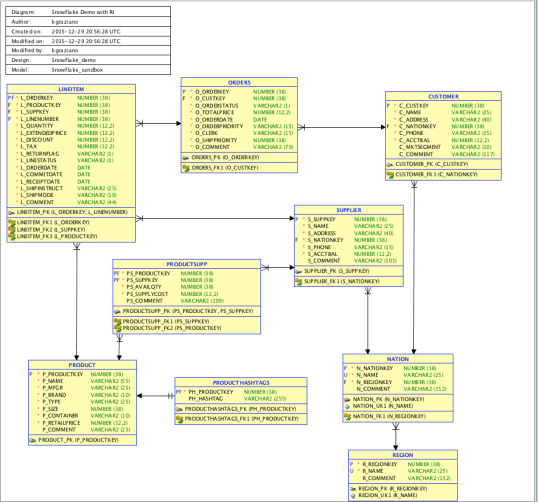
Snowflake with RI

So I can happily report that Philip’s little enhancement works just fine in 4.1.3. WooHoo! I can see this being very useful for a lots of cases in the future.

In a future post (early next year), I will continue with showing how we implemented Referential Integrity constraints in Snowflake DB and if I can generate the DDL from #SQLDevModeler.

Happy New Year Y’all

Kent

The Data Warrior & Snowflake Technical Evangelist

Data Warrior Agenda for 2016

Hard to believe 2015 is almost over.

It was a very busy year for me:

All of that has entailed a lot of air miles! This year I have visited:

  1. Denver (several times!)
  2. Salida, Colorado
  3. Hollywood, Florida,
  4. Raleigh, NC
  5. Charlotte, NC (thanks to Lynn Winterboer for that one!)
  6. San Francisco
  7. Redwood City, California (Oracle HQ)
  8. Austin (drove this one)
  9. Minneapolis/ St Paul (thanks to Redpill Analytics mostly)
  10. Kansas City, Missouri
  11. Portland, Maine
  12. St Albans, Vermont
  13. Stowe, Vermont
  14. San Mateo, California (HQ for Snowflake Computing)

And that was just work related! Family trips took me to:

  1. Galveston (beach!)
  2. South Padre Island, TX (more beach!)
  3. Road trip to Central NY:
    1. Joplin, Missouri
    2. Hannibal, Missouri (Mark Twain museum)
    3. Chicago (to see robots at the Museum of Science and Industry)
    4. Sandusky, Ohio (just to sleep)
    5. Fulton, NY (to see my dad)
    6. Old Forge, NY (summer vacation in the mountains!)
    7. Huntsville, Alabama (NASA Rocket Center!)
  4. Who knows – the year is not over yet!

Speaking in 2016

2016 will be very busy with the new job for sure. I am already booked for a bunch of events. Here they are so far:

Data Day Texas – January 16 in Austin, TX

TDWI Webinar – Dymstyfying Elastic Data Warehousing (with Philip Russom) – January 26th

BIWA Summit – January 26-28 at Oracle HQ

RMOUG Training Days 2016 – Febuary 9-11 in Denver, CO (I have 2 hour deep dive on Feb 9th). Register early for discounts.

Enterprise Data World – April 17-22 in San Diego. Register early for discounts (by the end of the year for the best rate).

ODTUG KScope16 – June 26-30 in Chicago, IL. Register early and be sure to book the hotel!

Also likely speaking at World Wide Data Vault Consortium (WWDVC) – May 25-28 in Stowe, Vermont (TBD)

And many more to come! (watch my twitter feed for updates)

Hopefully I will see you at one or more of these events!

Wishing a safe a joyous holiday season!

Merry Christmas & Happy New Year!

Kent

The Data Warrior


Better Data Modeling: What is #DataVault 2.0 and Why do I care?

Have you heard?

Dan Linstedt has just had his new book published on Data Vault 2.0. It is called Building a Scalable Data Warehouse with Data Vault 2.0. If you are at all into data warehousing and agile design, you need to get this book now. So click here and be done.

For those of you not sure what this DV 2.0 stuff is all about and why you might want to learn about it, I recently did a series of guest posts for Vertabelo to introduce folks to the concepts. In the series I walk you through some of the history of Data Vault and why we need a new way to do data warehousing. Then I get into the basics of modeling the Data Vault, the Business Vault, and finally building Information Marts from a Data Vault.

So you can find the posts here:

Data Vault 2.0 Modeling Basics

The Business Data Vault

Building an Information Mart with Your Data Vault

Once you have read these, I am sure you will want to go buy the new Data Vault 2.0 book and maybe sign up for some online training on DataVaultAlliance.com.

Model on!

Kent

The Data Warrior

P.S. If you want to catch up, you can still purchase the original Data Vault (1.0) modeling book Super Charge Your Data Warehouse. It is a great reference book to have on hand (you can get it on Kindle too). Might as well have the whole set.

P.P.S. I turned this series into a Kindle ebook for easier reference, you can find it on my Author Profile or just click on the book cover in the right side bar above.

Post Navigation